LayerSweep
A Figma plugin for bulk style replacement during design system migrations.
Open in Figma CommunityThe Problem
Our team was moving to a new token structure across a large Figma file with thousands of layers. The old and new styles did not share a naming system, so replacing them by hand would have taken days and created a lot of room for mistakes.
My Role
Designer and Engineer
Tools
Figma Plugin API, TypeScript, Claude Code, OpenAI Codex
Project Overview
I built LayerSweep to make style migration in Figma less manual and less risky. The plugin scans a file for bound styles, lets users choose what to replace, maps old styles to new ones, and applies the changes in bulk. I built it around a real migration task inside our team, where the main challenge was not scale alone, but the fact that the old and new styles did not line up by name. After the core workflow worked on the actual file, I cleaned up the experience, made it usable for other designers, and published it on Figma Community.
Personal Goals
Solve a real problem for the team instead of building a speculative side project.
Take full ownership across product thinking, interface design, and implementation.
Figure out where AI tools actually save time and where they still need strong direction.
From Prototype to Product
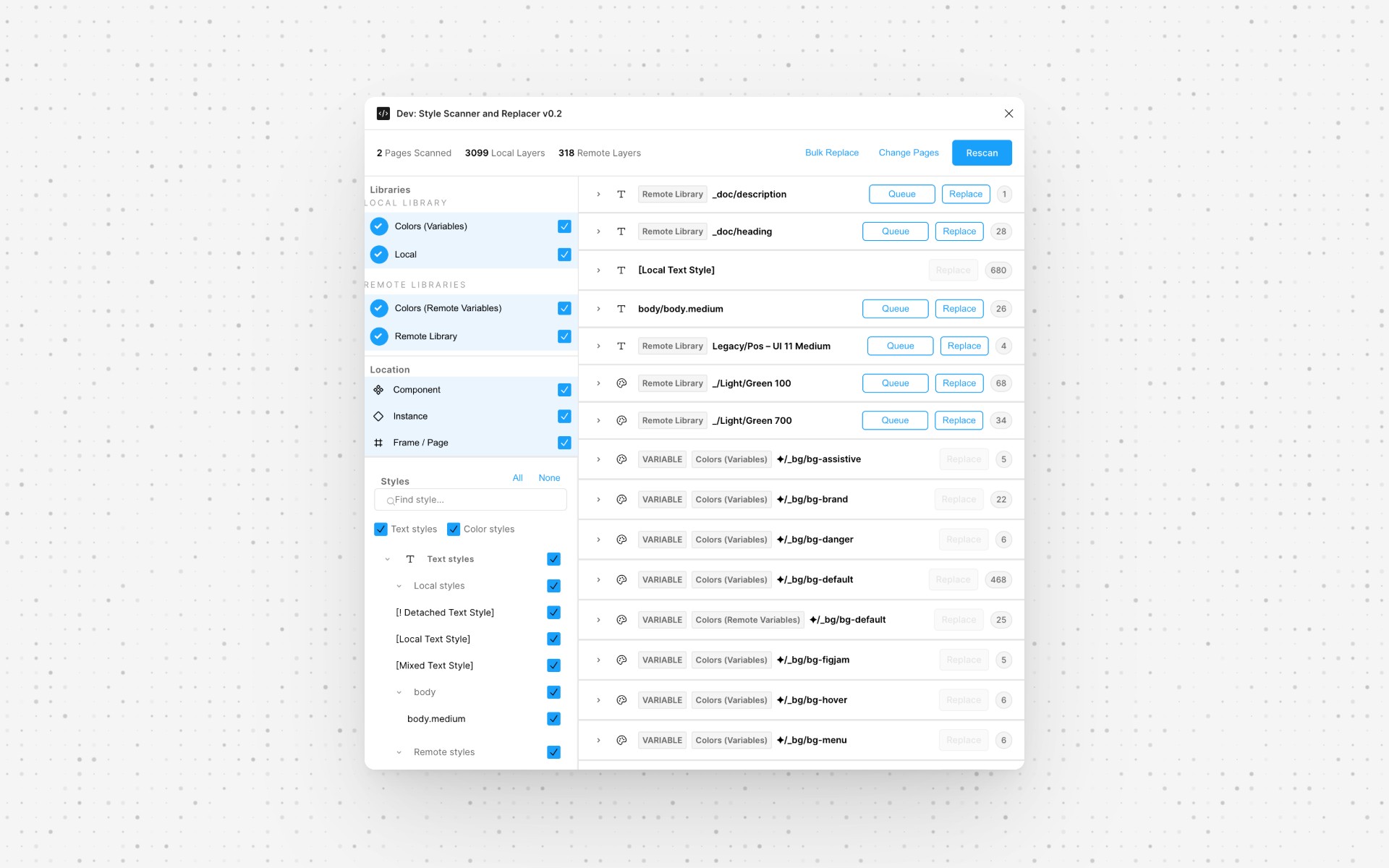
Early Version
I started by validating whether the idea was technically feasible. I explored the Figma Plugin API, checked if I could scan layers, read style bindings, and replace styles reliably. Once the core mechanics worked, I built a rough prototype around our actual migration task to test it on a real file.
Final Version
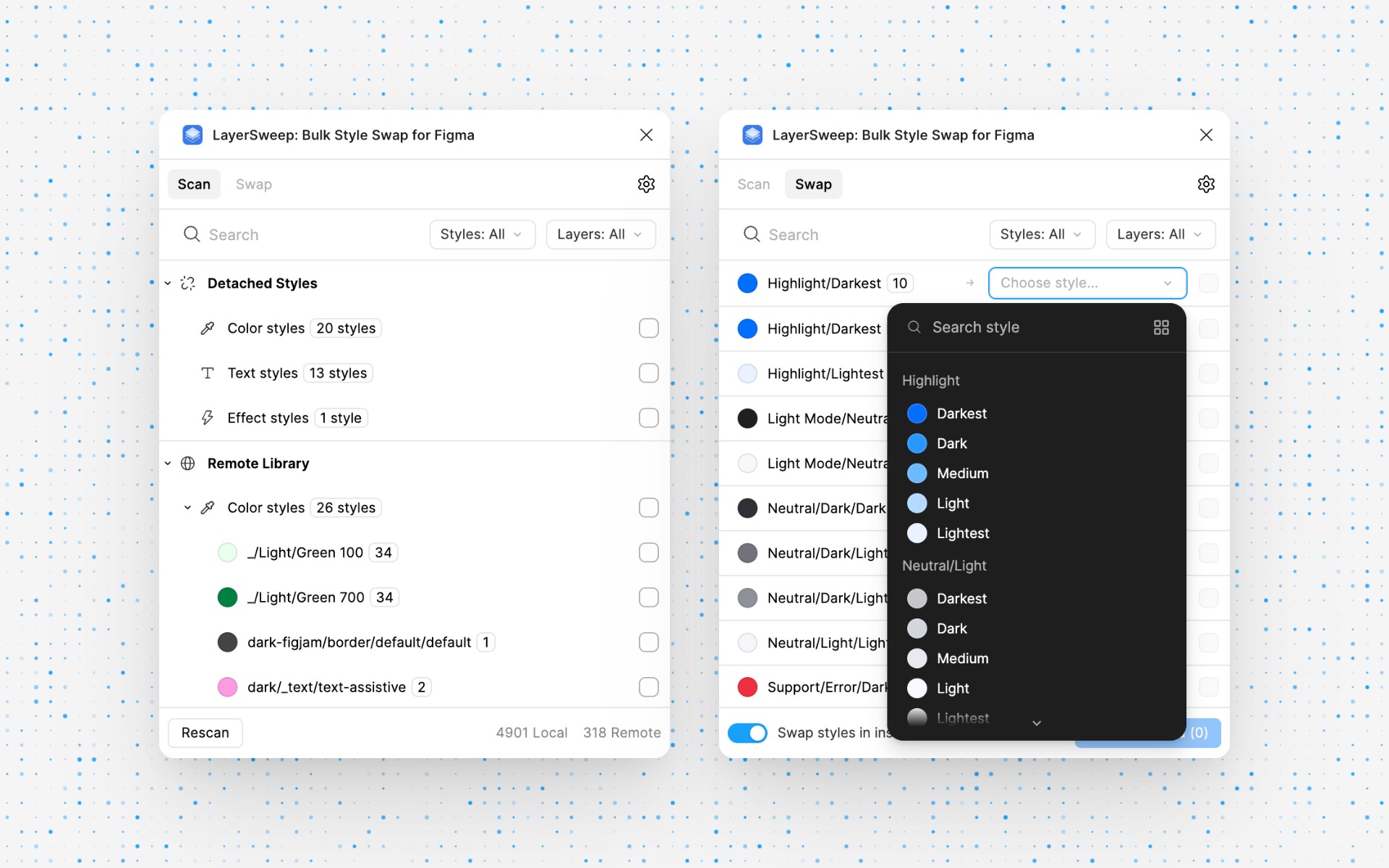
After the prototype proved useful, I refined the experience for other designers on the team. I improved onboarding, added clearer states and safer review steps, and polished the UI to feel at home inside Figma. This version was used internally for the migration and later published on Figma Community.
Features
Scoped Scan
Users can choose which pages and layer types to include before running a scan. This keeps the output focused, especially in large files.
Scan Results and Filtering
The plugin groups detected styles by source and type, shows usage counts, and supports search and filtering. Before changing anything, users can see exactly what is in the file.
Selecting Styles for Swap
Styles can be selected in bulk or one by one. That makes the workflow faster without taking control away from the user.
Choosing Target Styles
I did not rely on automatic matching by name. In this kind of migration, naming is often inconsistent, so forced guesses would make the tool less trustworthy. Instead, users choose the target styles directly.
Review Results
Before replacement starts, the plugin shows what will change and where. That gives users a chance to catch bad mappings before they commit. After the swap, users can review what was updated, what failed, and which layers were affected.
Dark and Light Theme
The interface supports light, dark, and auto themes to match the rest of the Figma environment.
AI Agents Workflow
I used Claude Code and Codex while building the plugin, but not as a substitute for product or technical judgment.
Claude Code helped most with structure and logic-heavy tasks. Codex was useful for faster iteration on smaller UI and utility pieces.
The weak point was the Figma Plugin API itself. It is specific enough that I still had to verify methods, correct bad assumptions, and steer the implementation. The main value was speed, not autonomy.
Results
The plugin turned a slow, repetitive migration task into a workflow the team could actually work through in a reasonable amount of time.
It also became a reusable internal tool instead of a one-off fix for a single file.
After that, I published it on Figma Community so the project had a public life beyond the original migration work.
What I’d Do Differently
I would bring other designers into testing earlier. The first version made sense to me because I built it, but new users needed more guidance than I expected.
I would also add lightweight analytics from the start. That would make it easier to see which parts of the workflow people actually use and where the tool still creates friction.
And I would define a clearer AI workflow earlier. The project went more smoothly once I stopped switching tools randomly and started using each one for the kind of work it handled best.